
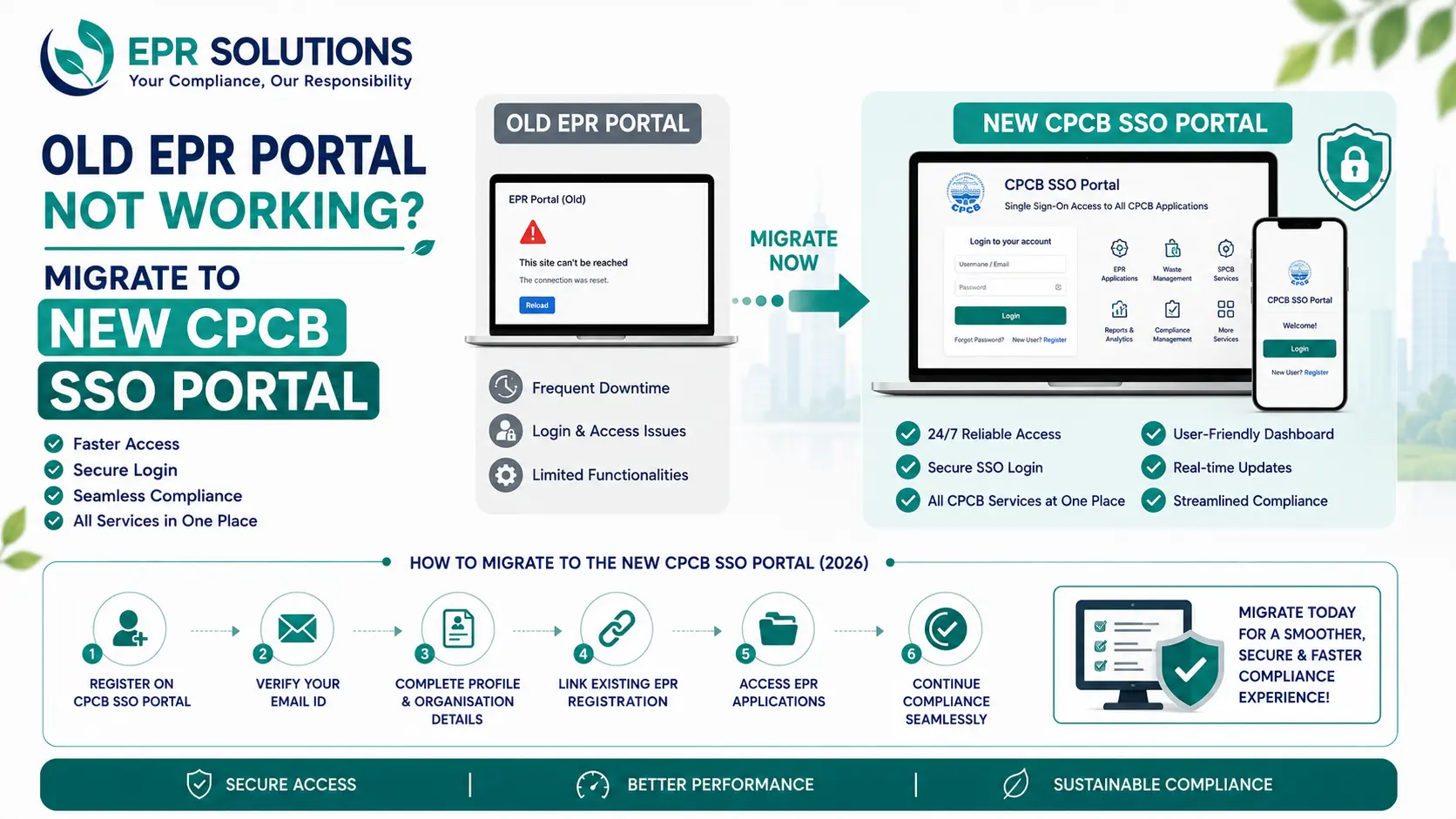
If you've tried logging into your usual CPCB EPR portal recently and hit a wall — a login that no longer accepts your old password, a blank dashboard, or a message you don't recognise — you're not alone, and nothing is broken on your end. CPCB has rolled out a new Single Sign-On (SSO) portal, officially called the Common EPR Portal, and it is progressively replacing direct access to the separate Plastic, E-Waste, Battery, Tyre, Used Oil, and ELV EPR portals that businesses have used for years.
This isn't a cosmetic redesign. It's a structural change to how every Producer, Importer, Brand Owner (PIBO), Recycler, and Refurbisher accesses their EPR compliance data, and it comes with a hard requirement: you need to actively link your existing account to the new system. Skip this step, and you risk losing access to annual return filings, EPR certificate transfers, and credit trading — right when your compliance cycle depends on them. This guide walks through exactly what changed, why your old login stopped working, and how to migrate correctly the first time.
What Is the CPCB SSO Portal (Common EPR Portal)?
The Central Pollution Control Board has consolidated its previously separate EPR portals — for Plastic Waste, E-Waste, Battery Waste, Waste Tyre, Used Oil, and End-of-Life Vehicles (ELV) — into a single unified platform accessible at epr.cpcb.gov.in. Instead of maintaining five or six different sets of login credentials depending on which waste streams your business handles, you now register once and receive a single master identity that gives you access to every EPR portal you're associated with, through one dashboard.
This matters for a simple, practical reason: many businesses aren't confined to a single waste category. A company that manufactures electronics with plastic packaging, for example, previously had to manage two entirely separate portal logins, two sets of credentials, and two disconnected compliance workflows. The Common EPR Portal removes that fragmentation. Log in once, and toggle between waste streams under one corporate profile.
Worth knowing: The SSO portal itself doesn't replace your underlying waste-stream registration — your Plastic EPR or Battery EPR authorization still exists. What changes is how you access and manage it. The SSO is the front door; your legacy portal data sits behind it once linked.
Why Is My Old EPR Portal Login Not Working?
If your previous credentials suddenly stopped working, or specific modules like filing, certificate transfer, or credit purchase have quietly disappeared from your old dashboard, this is very likely the SSO transition, not a technical fault. CPCB is progressively restricting direct entry into the legacy waste-stream portals so that all activity routes through the new Common EPR Portal instead. Access to operational sections and submission modules is being phased out in stages until your master profile is generated and linked.
In practice, this shows up in a few common ways: a login page that no longer recognises your password, a dashboard that loads but shows limited or greyed-out functions, or an inability to complete an annual return or generate a certificate that worked perfectly a few months ago. None of these mean your registration has lapsed. It means the account is waiting to be reconnected on the new system.
Is Migrating to the CPCB SSO Portal Mandatory?
Yes. Moving to the unified SSO system is mandatory for every existing PIBO and recycler or refurbisher already registered under any CPCB EPR waste stream. This isn't an optional upgrade you can defer indefinitely — it's the access route CPCB is standardising around, and continued use of your existing registration depends on completing the link.
The consequence of delay is direct and measurable: your EPR credit transactions can get blocked, meaning no buying, selling, or transferring of credits; your compliance filings can get delayed, which disrupts your entire annual cycle; and by the time the disruption becomes obvious, filing deadlines or credit-trading windows may have already passed. Fixing a stalled compliance cycle after the fact is consistently harder, slower, and more expensive than completing the migration correctly at the outset.
Who Needs to Migrate?
Producers
Manufacturers who introduce plastic packaging, batteries, tyres, or electronics into the Indian market and hold an existing EPR registration for their waste stream.
Importers & Brand Owners
Businesses that import regulated products or sell them domestically under their own brand, and are classified as PIBOs under the relevant waste management rules.
Recyclers
Entities registered with CPCB or the concerned SPCB/PCC to recycle plastic, battery, tyre, or e-waste material and generate tradable EPR certificates.
Refurbishers
Authorised refurbishers whose operations feed into the EPR credit and lifecycle-tracking system, particularly under battery and e-waste rules.
What You Need Before You Start the Migration
Migration goes faster and with fewer errors if you gather the following before you begin:
- Old portal login credentials — for every legacy waste-stream portal your business is registered on, or be ready to reset a forgotten password using the portal's Forget Password option
- Company GSTN and registration details — these are cross-checked against your existing EPR authorization, so they need to match exactly
- A dedicated corporate email ID — belonging to the authorised compliance representative, not a shared inbox or a consultant's address
- An active mobile number — again, the compliance head's own number, since real-time OTPs are sent to both the email and mobile channel
- A list of every waste stream you're registered under — Plastic, E-Waste, Battery, Tyre, Used Oil, or ELV — so nothing gets missed during linking
Note on consultant access: CPCB's guidance is explicit that a consultant's, agent's, or third party's contact details should not be used for portal login. Migration should be initiated and completed using the business's own authorised email and mobile number.
Step-by-Step: How to Migrate to the CPCB SSO Portal
Go to the Common EPR Portal
Navigate to the official CPCB SSO portal at epr.cpcb.gov.in. This is the single entry point for every EPR waste-stream portal going forward.
Click Sign Up / New Registration
Start creating your master administrative profile. This is separate from — and sits above — any registration you already hold on a legacy portal.
Enter your corporate email and mobile number
Use the dedicated email ID and mobile number of your company's authorised compliance representative. This becomes the identity your new CEPR ID is built around.
Complete OTP verification
Validate the real-time OTPs sent to both your email and mobile number to confirm your new global CEPR login credentials.
Open Link Existing Portals
On your new dashboard, locate the Link Existing Portals feature and select each legacy waste-stream portal where your company holds an active registration — Plastic, Battery, Tyre, E-Waste, Used Oil, or ELV.
Enter your old portal credentials
Input your existing login details for each waste-stream portal, or use the Forget Password option if you run into a credentials mismatch during linking.
Confirm the link
Once your old and new details match, confirm the link. The action icon on your dashboard shifts from "Link" to "Open," pulling all your existing registrations and data into your central SSO profile.
Activate ETP access and verify company details
Turn on your EPR Transaction Portal (ETP) access, verify that your company details match across every linked stream, and re-link any recyclers you work with so credit trading continues without interruption.
Logging In to the New CPCB SSO Portal
Once your Common EPR Portal registration is complete, all future logins happen through epr.cpcb.gov.in rather than through the individual waste-stream portal URLs you may have bookmarked. Enter the email or credentials you registered with, along with your password, and you'll land on a single dashboard that lists every EPR portal linked to your profile.
If you're locked out or have forgotten your new SSO password, use the Forget Password link on the login page rather than repeatedly attempting old credentials — repeated failed attempts are one of the more common causes of the "system-handshake" style errors businesses report during this transition.
What Is a CEPR ID, and Why Does It Matter?
The CEPR ID is the master identity generated the moment your Common EPR Portal registration is complete. Think of it as the single reference number that replaces the separate usernames you previously held across Plastic, Battery, Tyre, E-Waste, Used Oil, or ELV portals. Every linked waste stream now sits under this one identity.
This matters beyond convenience. Filing status, certificate history, and credit balances are increasingly tied to your CEPR ID rather than to any individual legacy portal login. If your CEPR ID hasn't been generated, or if the Legacy Portal Linking step was skipped, access to submission modules and operational sections is progressively restricted — which is precisely the "portal not working" experience many businesses are currently running into.
The EPR Transaction Portal (ETP) and Your Credit Trading
The EPR Transaction Portal, or ETP, is CPCB's centralised electronic marketplace for EPR credit generation, purchase, sale, and transfer between producers and recyclers. Before the SSO rollout, this activity was spread across separate portals and harder to track end-to-end. With the ETP folded into the SSO ecosystem, every transaction is recorded in one place and visible against your CEPR ID.
Activating your ETP access is not automatic — it's a distinct step after SSO registration. Skipping it, or completing SSO registration without running the linking step for every waste stream you trade credits under, is one of the most common reasons businesses report credits that don't show up, or show up incorrectly, after migration.
If you trade EPR credits regularly: verify your credit balance and recent transaction history on the ETP immediately after linking each waste-stream portal, rather than assuming the transfer happened silently in the background.
Common Mistakes to Avoid During CPCB SSO Migration
CPCB's guidance specifically asks that consultant, agent, or third-party contact details not be used for portal login. Register using your own authorised compliance representative's dedicated email and number.
If your business is registered across multiple waste categories — say, Plastic and Battery — linking only one leaves the other portal's filings and credits disconnected from your new CEPR ID.
Even a small discrepancy between your legacy registration details and your new SSO profile can prevent a successful link or cause data to import incorrectly.
Repeatedly entering an incorrect old-portal password causes system-handshake errors during linking. Use the Forget Password route on the legacy portal first if you're unsure of your credentials.
Migration issues — login errors, unresolved OTPs, data mismatches — typically need to be raised as tickets with CPCB, and resolution isn't instant. Starting early leaves room to fix problems before they affect a deadline.
Final thoughts
The shift to the CPCB SSO portal isn't just a login change — it's the new backbone for how every EPR filing, certificate transfer, and credit trade gets recorded and verified going forward. An old portal login that stops working is usually the system doing exactly what it's designed to do: waiting for you to complete the link. Registering early, linking every waste stream you hold, and verifying your ETP credit balance right after migration are the three things that keep the rest of your compliance cycle running without interruption.
If you hit a login error, an OTP that never arrives, or credits that aren't reflecting correctly after linking, treat it as a migration issue to resolve promptly rather than something to work around — the earlier it's raised, the faster it tends to get sorted.
Need help migrating your EPR account, or with EPR compliance more broadly?
CPCB SSO migration can involve several moving parts across multiple waste-stream portals, and a single mismatched detail can stall the process. Our team at EPR Solutions can help you migrate correctly the first time, and support you with Plastic, Battery, Tyre, E-Waste, and Used Oil EPR registration and ongoing compliance.
Talk to our teamFrequently Asked Questions
The CPCB Single Sign-On (SSO) portal, also called the Common EPR Portal, is a unified platform that lets producers, importers, brand owners, recyclers, and refurbishers log in once at epr.cpcb.gov.in to access all EPR waste-stream portals — Plastic, E-Waste, Battery, Tyre, Used Oil, and ELV — instead of maintaining separate logins for each.
CPCB is progressively restricting direct access to the legacy waste-stream portals as part of the SSO rollout. If you haven't linked your old account to the new Common EPR Portal, you may lose access to filing, credit trading, or certificate transfer functions until the linking step is completed.
Yes. Migration to the unified SSO system is mandatory for all existing PIBOs and recyclers or refurbishers already registered on any of CPCB's legacy EPR portals. Continued access to filings and credit transactions depends on completing the link.
Delaying migration can block your ability to buy, sell, or transfer EPR credits, disrupt your annual return filing cycle, and, since old portal access is being progressively phased out, ultimately cut off your ability to manage compliance obligations tied to your existing registrations.
After registering on the Common EPR Portal, use the Link Existing Portals option on your dashboard, select each legacy waste-stream portal you're registered on, and enter your old login credentials, or use Forget Password if needed. Once matched, the portal status changes from Link to Open.
The CEPR ID is the master identity generated when you complete registration on the Common EPR Portal. It becomes your single reference across all linked waste-stream portals, replacing the need to track separate usernames for Plastic, Battery, Tyre, E-Waste, Used Oil, or ELV EPR accounts.
The ETP is CPCB's centralized marketplace module within the SSO ecosystem where EPR credit generation, purchase, sale, and transfer between producers and recyclers takes place. Activating ETP access is a required step after SSO registration to keep credit trading uninterrupted.
OTP delivery issues usually happen when the mobile number or email entered doesn't match the authorized person's active, dedicated contact details, or when a consultant's contact information was used instead of the company's own. Re-check that you've entered the compliance head's direct email and mobile number.
Keep your old portal login credentials, or be ready to reset them, your company's GSTN and registration details, a dedicated corporate email ID, and the mobile number of your authorized compliance representative ready before you begin.
Your historical data and credit ledger are pulled into the new system once each legacy portal is successfully linked, but you should verify your credit balance and transaction history on the ETP after linking, since mismatched company details can cause credits to not reflect correctly.